If your monthly SEO report is a 30-page PDF and you still can't tell whether your money is working, the problem is not you. Most reports are built to look thorough, not to answer a business owner's questions. Dashboards make it easy to produce dozens of charts, and very few of them change a decision.
This guide explains where SEO numbers come from, which five deserve your attention, how to read them over time, what to ignore, and which red flags suggest a report is hiding something. The charts use sample data made up for illustration, not results from a real client.
What a report must answer
Before any chart, a useful report answers four plain questions, ideally on its first page:
- Did more of the right people find us on Google? This is about visibility for searches that match what you sell.
- Did they contact us or buy? Traffic without enquiries or sales is a cost, not a result.
- What was done, and what did it change? Every task should connect to a page, a fix, or a measurable effect.
- What happens next month, and why? A plan, with a reason for the priority order.
If you can't find these answers in the first page or two, ask for them. A good SEO should be able to say them out loud in a ten-minute call.
Where the numbers come from
Most of what you need comes from two free Google tools, and it helps to know what each one measures.
Google Search Console shows how your site appears in Google Search: impressions, clicks, the queries that triggered your pages, the pages that appeared, and your average position. It records what happens on Google's results page.
Google Analytics 4 (GA4) shows what visitors do after they arrive: sessions, engagement, and key events such as form submissions, calls, or purchases. It records what happens on your website.
The two will not match exactly, and that is normal. Search Console counts clicks on results, while GA4 counts sessions, and the gap comes from things like visitors who decline cookies, different time zones, and the way each tool counts a visit. Treat the two as answering different questions, not as a pair to reconcile line by line. If a report shows numbers from other tools too, ask which one is the source for each figure.
Both accounts should belong to you. If your SEO set them up under their own login, ask for owner access. You should be able to log in and see the same numbers the report shows.
The five numbers that matter
1. Clicks. The number of times someone clicked from Google results to your site. This is real search traffic. Look at the trend over three to six months, not one month against the last. Ask: which pages gained or lost clicks, and is the growth coming from pages that matter to the business?
2. Impressions. How often your pages appeared in results. Rising impressions often move before clicks, because Google is testing your pages for more searches. That makes them a useful early signal, especially on a newer site. On their own they pay no bills: impressions with no clicks usually mean your pages appear but rank too low, or the title and description are not persuasive.
3. Queries. The searches that triggered your pages. Scan the list and ask whether these are things your customers would type. Ten thousand impressions for searches nobody buying from you would use is not progress. Look especially for searches with many impressions and few clicks, because those are the quickest opportunities to improve a title or rewrite a page.
4. Landing pages. The pages where search visitors arrive. You want your service and product pages to appear among the top pages, not only blog posts. If all your traffic lands on one article, your site is not yet doing the work of selling.
5. Conversions. Enquiries, calls, form submissions, or sales that came from organic search. In GA4 these are set up as key events. This is the number that connects SEO to revenue. If tracking is missing or broken, getting it working should be the first task in the report, because nothing else can be judged without it. Where phone calls matter, ask how they are tracked, for example with a call-tracking number or a click-to-call event. If you serve a local area, calls and direction requests from your Google Business Profile belong in the report too, and good local SEO should show up in them.
Reading trends properly
A single month rarely tells you much. Search demand rises and falls with the season, holidays change behaviour, and short dips happen for ordinary reasons. Read the numbers like this:
- Compare the same period. Where you have the data, compare this month with the same month last year, not only with last month. Search Console keeps about 16 months of history, so start saving exports early.
- Use three- to six-month trends. Direction matters more than any single point.
- Ask for a change log. Each report should list what was changed and when: new pages, rewritten titles, fixed redirects. Without dates you cannot connect a change to a result.
- Separate brand from non-brand. This one matters enough to have its own heading.
Brand and non-brand searches
Branded queries include your business name. Someone searching for you by name was already looking for you, so growth in those searches often reflects word of mouth, ads, or offline marketing rather than SEO. Non-branded queries, such as a service plus a city, are where SEO brings you new customers. Ask for the Search Console query data split into the two groups. A report that shows rising clicks without saying how much is brand can overstate the SEO impact.
What to ignore or treat with care
- Average position. It is an average across every query, so adding many new low-ranking searches can make it worsen even while traffic grows. Check positions for your five or ten most important pages and searches instead.
- Domain rating and authority scores. They come from third-party tools, not from Google. They are useful context for link-building, but they are not results and don't directly measure leads.
- Total keywords ranking. A large number often means many obscure searches. Ask how many are relevant to what you sell.
- Bounce rate and time on site, alone. They vary by page type. A contact page with a short visit and a phone call is a success.
- Site health scores from audit tools. A score of 92 out of 100 says little if the missing points include a problem that blocks Google from your best service page. Ask which issues were fixed and what they affected.
- Traffic from outside your market. Clicks from countries you don't serve inflate totals without helping the business.
A sample report in two charts
Here are six months of sample data for a small service business. Clicks climb every month, which looks like a success story in a dashboard.
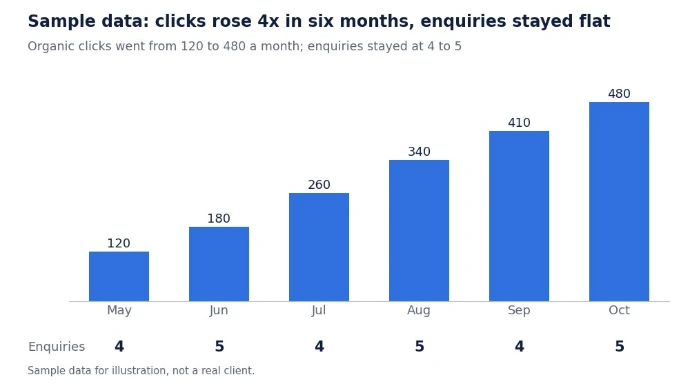
Now look at the row underneath. Enquiries stayed at four or five a month the whole time. More traffic did not become more leads. A report that stops at the clicks line would call this a great half-year, while a report that includes enquiries tells you something is wrong between the visit and the contact.
The next step is to find out why. The usual suspects are:
- Wrong pages. The traffic goes to pages that attract readers rather than buyers.
- Unclear next step. Service pages rank, but the page doesn't make it obvious what to do next.
- Friction. The contact form or phone link is hard to find, slow, or broken on mobile.
- Wrong searches. The queries bring curious visitors, not people ready to hire.
- Tracking gaps. Enquiries are happening but not being recorded, for instance calls or messages that don't fire a key event.
The second chart shows where the clicks went.
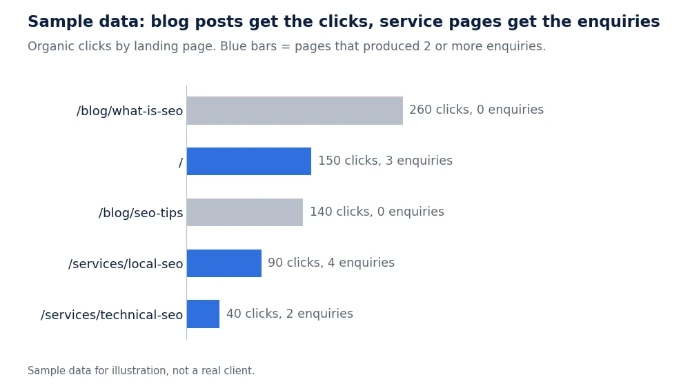
The two blog posts bring the most visitors and no enquiries, while the service pages bring far fewer clicks and nearly all the leads. The practical conclusion is not "stop blogging." It is to link from those posts to the relevant service pages, improve the service pages that already convert, and judge future content by whether it supports them. A report that shows landing-page clicks next to enquiries makes this decision obvious. A report that shows only totals hides it.
A 10-minute monthly reading routine
You don't need to study every page. Use this order:
- Read the summary first. Does it answer the four questions above?
- Check conversions. Did enquiries or sales rise, fall, or stay flat?
- Check clicks and impressions. Look at the three- to six-month trend, not just last month.
- Scan landing pages. Are service and product pages getting search traffic?
- Scan queries. Are they relevant, and how much is brand versus non-brand?
- Read the work log. What changed, on which dates, and why?
- Read the next-month plan. Is it specific, ordered by priority, and tied to a goal?
Red flags in an SEO report
- No conversions anywhere. Rankings and traffic only, even though you have a contact form.
- Vague wins. "Improved site health" with no list of what was changed.
- No dates or change log. You can't connect work to results.
- Unexplained jargon. If you can't tell what a term means, the report is not serving you.
- Guaranteed rankings. No one controls Google's results, and Google's own guidance warns against anyone who promises a top position.
- One-month comparisons only. Normal fluctuation makes single-month swings hard to read.
- No access for you. You should own your Search Console and Analytics accounts and be able to see the same numbers.
- Screenshots without context. A chart that goes up is not an explanation.
Questions to ask your SEO this month
- Which three pages drove the most enquiries, and why?
- What did you change last month, and where do I see its effect?
- Are the searches bringing visitors the ones my customers actually use?
- How much of the growth is brand versus non-brand?
- What is the single biggest obstacle to more leads right now?
- What will you do next month, and what should I expect, by when?
When the numbers dip
A dip is not automatically a problem. Work through these in order before reacting:
- Seasonality. Compare with the same month last year if you have it.
- Tracking. Did a site change, a new cookie banner, or a form update break measurement? A sudden cliff in GA4 with steady Search Console clicks often points here.
- A single page. Did one important page lose clicks, change its URL, or drop out of Google's index? Search Console's page reports will show it.
- A Google update. Large changes to Google's ranking systems can move many sites at once. If your drop lines up with a documented update, ask your SEO for a specific recovery plan, not a general reassurance.
- Your own changes. Did a redesign, URL change, plugin update, or removal of content happen recently?
- Competition. A new competitor or a changed results page can shift clicks even when your rankings hold.
Wait for a few weeks of data before making big decisions, unless something is clearly broken, such as pages blocked from indexing.
What a good report looks like
A good monthly report is short, in plain English, and leads with business results. It shows organic clicks and impressions, the pages and queries behind them, enquiries or sales from organic search, a dated list of work completed, and a prioritized plan for next month. It explains what the numbers mean, and it admits when something didn't work.
That is how I report to clients. If you'd like a second opinion on a report you already have, request a free SEO audit and I'll tell you what it is showing and what it is missing.